

KB-M3-03
Reference Price : 129.99 USD / 139.99 EUR / 119.99 GBP / 21999 JP¥
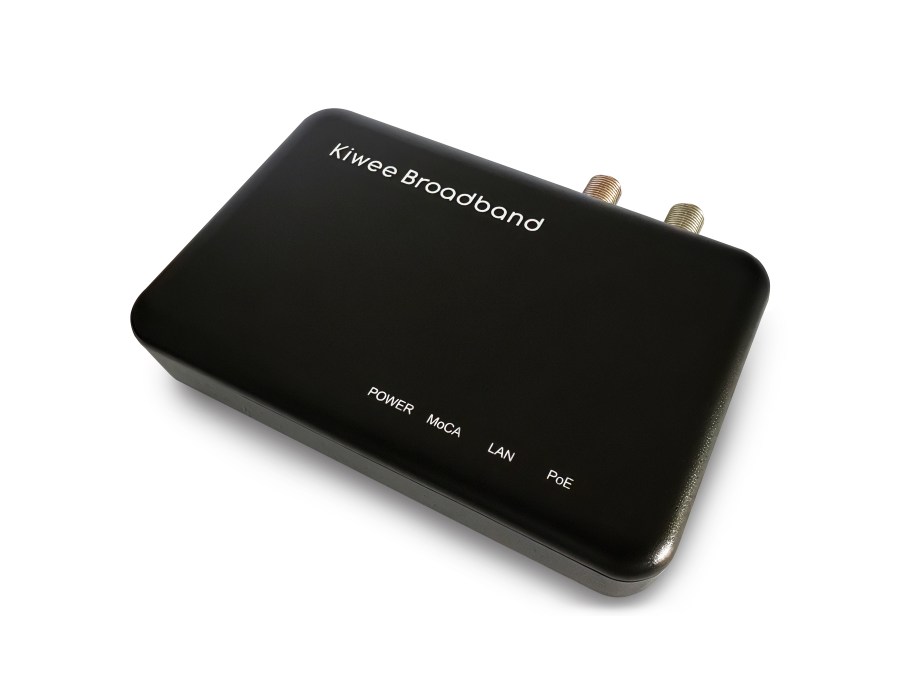

PowerBridge 2.5G Kit
The First MoCA 2.5 + PoE+ Adapter Kit on the Market
Experience a new era of networking with the PowerBridge 2.5G Kit—the first ever solution to combine blazing-fast MoCA 2.5 speeds with integrated PoE+ (IEEE 802.3at) power delivery. This innovative kit transforms your existing coaxial wiring into a high-speed, multi-gigabit backbone while simultaneously powering your devices—no extra power outlets, no messy cables, just seamless performance.

Why choose PowerBridge 2.5G Kit?
- First to market: MoCA 2.5 + PoE+ in a single, easy-to-use kit
- Ultra-fast speeds: Up to 2.5 Gbps over coax for flawless 4K/8K streaming, gaming, and cloud access
- True plug-and-play: Set up in minutes, no software or configuration required
- Power where you need it: Deliver PoE+ to Wi-Fi 6E/7 access points, IP cameras, VoIP phones, and more—even in hard-to-reach spots

How It Works: Whole-Home Connectivity
Imagine your home or office:
- Coaxial wiring runs through the walls.
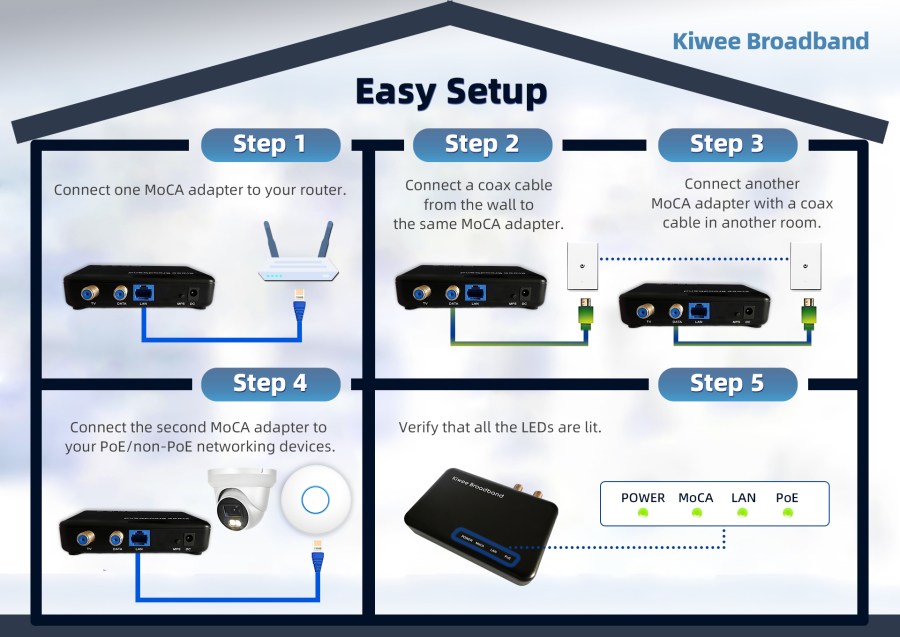
- PowerBridge 2.5G adapters connect at each end—one near your router, the other wherever you need connectivity.
- Ethernet output delivers both high-speed data and PoE+ power to your device.
Connect a Wi-Fi 7 access point on the ceiling, a PoE camera outside, or a VoIP phone in a meeting room—no new outlets, no hassle.
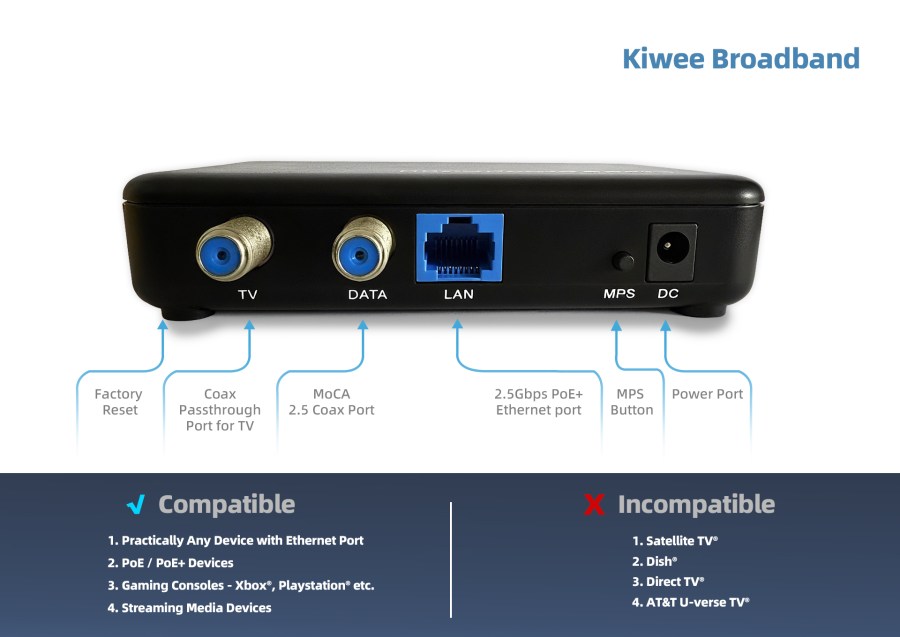
MoCA 2.5 + PoE+ Adapter Details
- MoCA 2.5 Technology: Achieve up to 2.5 Gbps data transfer over your existing coaxial cables—no need for new wiring.
- PoE+ Support (IEEE 802.3at): Power devices directly via Ethernet, eliminating the need for separate power adapters.
- 2.5G Ethernet Port: Enjoy true multi-gigabit speeds for demanding applications.
Easy to Set Up and Easy to Use
Upgrade your connectivity with the PowerBridge 2.5G Kit—where speed meets simplicity and power.
Tech Specs
| INTERFACES: | – One 10/100/1000/2500 Base T Ethernet LAN with PoE Standard IEEE802.3af (15.4W)/IEEE802.3at (30W) – One MoCA 2.5/2.0/1.1/1.0 Coaxial Jack (1125MHz~1675MHz) – One TV Coaxial Jack (5MHz~1002MHz) – One MPS Pairing button – One Reset Push button |
| NETWORK SIZE: | – Up to 16 Devices (including NC) |
| CHIPSETS: | – MaxLinear MxL3710 – MaxLinear GPY211 |
| REGULATORY: | – FCC, CE – UL |
User Manual
Other languages user manuals are available below:
Firmware
1.18.13.13 Based on Maxlinear SDK v1.18.13
FAQ
► Which WiFi access points can be powered by the PoE+ feature?
► Is the D-band adapter compatible with Xfinity/Comcast cable modems?
► Can I power security cameras with the PoE+ port?
► What speeds can I expect in real-world use?
► Will this work in apartments or condos with shared coax?
► Is it backward compatible with older MoCA devices?
► Can I mix this adapter with other MoCA brands?
► Can I use this adapter for mesh WiFi backhaul?
Tutorial Videos
►Configure MoCA in D-Band High to Eliminate DOCSIS 3.1 Interference
Improve MoCA performance by shifting to D-band High (1350–1675 MHz) to avoid overlap with DOCSIS 3.1 modems/routers that reach up to 1218 MHz. This guide walks you through updating all MoCA devices to the same D-band High setting and LOF values to ensure a solid, interference-free connection.
Steps:
- Locate MoCA settings on each adapter via web interface
- Change the frequency band to D-band High (1350–1675 MHz).
- Apply the 1400Mhz LOF value on every MoCA device
- Repeat steps 1–3 for all MoCA adapters in the network.
- Restart each device to apply the new settings.
- Reconnect all equipment and verify that MoCA link lights are solid and network performance is stable.
Tips:
If a device remains on the old band, recheck the configuration on that unit and reapply settings.
Ensure all adapters use the same band and LOF values; a mismatch can prevent links from coming up.
►Check MoCA Adapter Firmware and Link Rate for Stable Performance
When issues arise, verify the MoCA adapter’s firmware version and link rate. The link rate indicates the stability and reliability of the MoCA connection, so give it close attention. A healthy link rate is typically around 3500 Mbps.
►Switch MoCA Adapter from Static IP to DHCP for Automated Management
Some users prefer the MoCA adapter to obtain its management IP address via DHCP. This guide provides clear, step-by-step instructions to enable DHCP on the MoCA device, improving network flexibility and ease of management.
►Enable MoCA Traffic Security Protection Across Your Network
Activating the Security feature protects data transmitted over the MoCA network from unauthorized devices. All MoCA devices on the network must support and enable this feature; older devices may not. MoCA 2.5 devices generally support it. Before enabling, verify the device types in your home to avoid connection failures.
Compare Models
| Model Number | KB-M3-02 | KB-M3-03 | KB-M3-02E |
| MoCA Standard | MoCA 2.5 | MoCA 2.5 | MoCA 2.5 |
| Frequency Band | D Band (1150–1650 MHz) | D Band (1150–1650 MHz) | E Band Extended (400–900 MHz) |
| Ethernet Ports | 2 × 2.5GbE | 1 × 2.5GbE | 2 × 2.5GbE |
| Power over Ethernet (PoE+) | No | Yes | No |
| Max Throughput | Up to 2.5 Gbps | Up to 2.5 Gbps | Up to 2.5 Gbps |
| Compatibility | DOCSIS, CATV, MoCA D Band | DOCSIS, CATV, MoCA D Band | Satellite TV, MoCA E Band |
| Not Compatible With | Satellite TV, MoCA E Band | Satellite TV, MoCA E Band | DOCSIS, CATV, MoCA D Band |
| Typical Use Case | Multi-device, high-speed LAN | Single device, PoE-powered devices | Satellite TV homes, multi-device LAN |
| Installation | Plug & Play | Plug & Play, PoE simplifies power | Plug & Play |
| Buy Now | Buy Now | Buy Now |
 MoCA 2.5 Adapter with Dual 2.5G Ethernet Ports – Faster Home Networking | Kiwee Broadband