REVOLUTIONARY BREAKTHROUGH

Introducing the KB-M3-03 MoCA 2.5 Adapter with Dual 2.5G Ports + PoE+

The Future of Home Networking is Here

🚀 COMING SOON: The World’s First MoCA 2.5 Adapter with Integrated PoE+ Technology

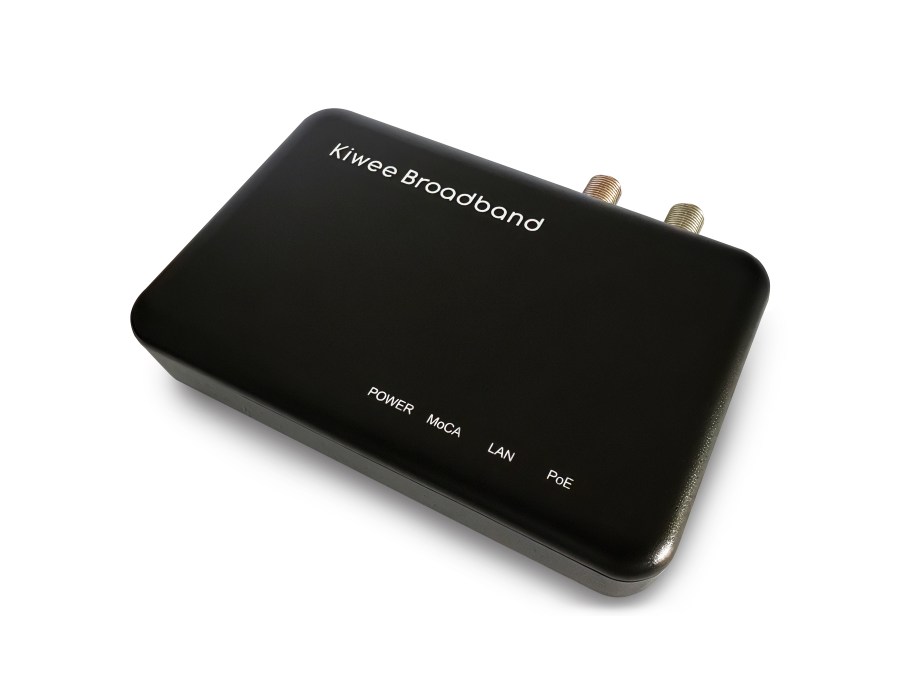
Kiwee Broadband is proud to announce the upcoming launch of the KB-M3-03, the industry’s most advanced MoCA 2.5 network adapter featuring w 2.5 Gigabit Ethernet port and integrated PoE+ power delivery – a world-first innovation that will revolutionize how you think about home and office networking.
Why the KB-M3-03 Changes Everything

🔥 UNPRECEDENTED SPEED & CONNECTIVITY

  • True 2.5 Gbps Performance: Experience genuine multi-gigabit speeds that crush buffering, eliminate lag, and support simultaneous 4K/8K streaming across multiple devices
  • Zero Network Congestion: Share 2.5 Gbps bandwidth intelligently across up to 16 MoCA nodes in your network

⚡ GAME-CHANGING PoE+ INTEGRATION

  • 25.5W PoE+ Power Delivery: Power demanding devices like wireless access points, IP cameras, and VoIP phones directly through Ethernet – no separate power cables needed
  • Simplified Installation: One cable does it all – data + power, reducing installation time by 60% and eliminating the need for electrical outlets

🛡️ ENTERPRISE-GRADE RELIABILITY

  • Ultra-Low Latency: Less than 3ms latency for professional gaming, video conferencing, and real-time applications
  • Interference-Free Connection: Coaxial cable shielding provides rock-solid stability that Wi-Fi simply cannot match
  • Plug-and-Play Setup: Auto-detection with MoCA Protected Setup (MPS) – full network in under 5 minutes

Perfect For Modern Digital Demands

🏠 SMART HOME ENTHUSIASTS
Transform your existing coax wiring into a high-speed backbone for smart home devices, security systems, and IoT applications

🎮 GAMERS & STREAMERS
Eliminate lag with dedicated 2.5G connections for gaming consoles, streaming equipment, and content creation setups

🏢 SMALL BUSINESS & HOME OFFICES
Deploy professional-grade networking with PoE-powered access points, IP phones, and security cameras without rewiring

📡 CORD-CUTTERS & STREAMING FAMILIES
Support multiple 4K/8K streams, cloud gaming, and bandwidth-intensive applications simultaneously

Technical Specifications That Matter

FeatureKB-M3-03 Specification
MoCA StandardMoCA 2.5 Bonded (5 channels)
Network ThroughputUp to 2.5 Gbps aggregate
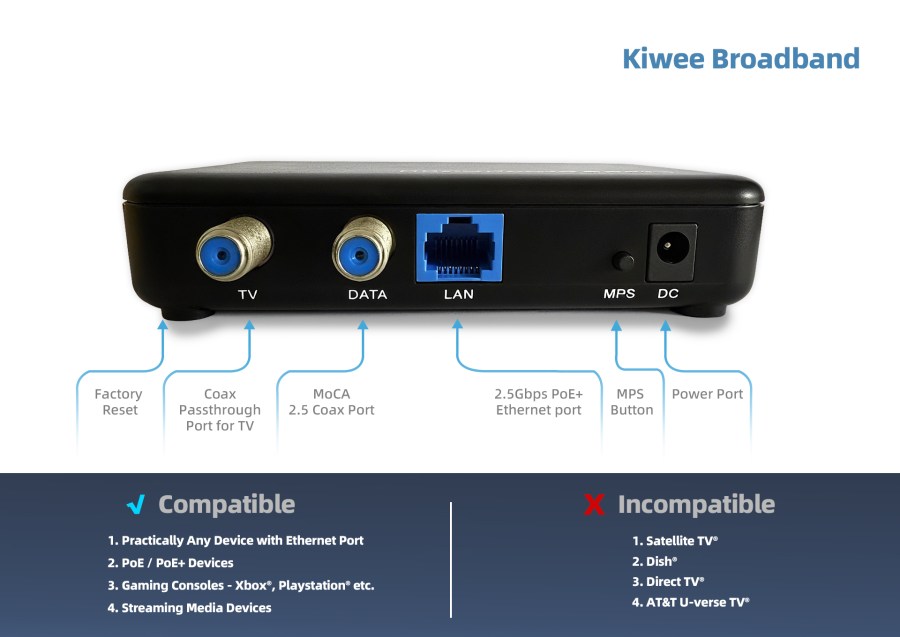
Ethernet PortSingle 2.5 Gigabit Ethernet
PoE+ Power25.5W per port (IEEE 802.3at)
Latency<3ms typical
Range300+ feet over coax
Max Nodes16 adapters per network
EncryptionAES 128-bit encryption
CompatibilityBackward compatible with MoCA 2.0/1.1

Why Choose Kiwee Broadband?

World’s First: Only manufacturer offering MoCA 2.5 with integrated PoE+
Global Leader: Trusted by customers in 15+ countries
Future-Proof: Ready for next-generation networking demands
The Science Behind Superior Performance

MoCA 2.5 Technology Advantages:

  • Bonded Channel Architecture: Uses 5 bonded channels (500-1650MHz) for maximum throughput
  • Full-Duplex Communication: True bidirectional data flow unlike half-duplex alternatives
  • Coaxial Superiority: 8x lower signal loss compared to powerline networking
  • Interference Immunity: Shielded coax prevents external RF interference

PoE+ Integration Benefits:

  • Single Cable Solution: Eliminates separate power infrastructure costs
  • Flexible Device Placement: Install devices anywhere coax reaches
  • Energy Efficient: Intelligent power management reduces consumption
Real-World Performance Metrics

Speed Tests That Speak:

  • Download speeds: Up to 2.4 Gbps real-world performance
  • Upload speeds: Up to 2.4 Gbps sustained
  • Latency: 2.8ms average (vs 15-30ms typical Wi-Fi)
  • Packet loss: <0.01% under normal conditions

Power Delivery Capabilities:

  • IP cameras
  • Wireless access points: Power Wi-Fi 6E access points fully
  • VoIP phones: Support for advanced business phone systems
  • IoT devices: Future-ready for emerging smart technologies

Installation Made Simple

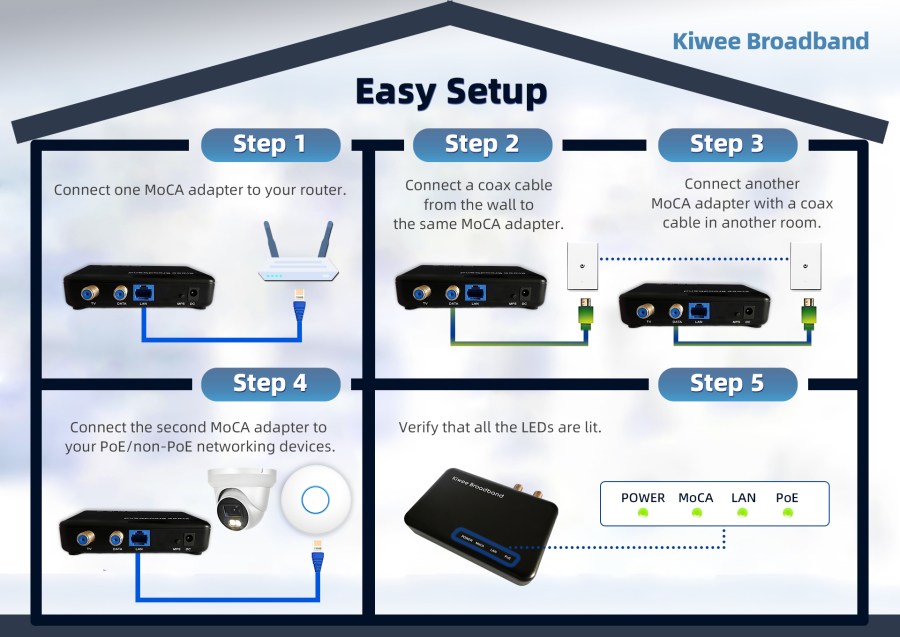
Step 1: Connect KB-M3-03 to existing coax outlet
Step 2: Connect to router with included Ethernet cable
Step 3: Auto-configuration completes in 60 seconds
Step 4: Connect PoE+ devices and enjoy instant power + data

What’s Included:

  • KB-M3-03 MoCA 2.5 + PoE+ Adapter
  • High-quality Ethernet cable
  • Coaxial cable
  • Power adapter
  • Quick start guide

Industry Recognition & Awards

Pricing & Availability

Launch Date: October 2025
Pre-order Bonus: Free MoCA filter + priority shipping

Join the Networking Revolution

The KB-M3-03 isn’t just another adapter – it’s the foundation of next-generation home and business networks. Don’t settle for yesterday’s technology when tomorrow’s solution is here today.

🔔 Be Among the First
Sign up for launch notifications and get exclusive early access, special pricing, and priority technical support.

🌐 Learn More: https://kiwee-broadband.com/moca-2-5-adapter-2-5ge-and-poe/

SEO Keywords Integration

MoCA 2.5 adapter, dual 2.5 gigabit ethernet, PoE+ networking, power over ethernet plus, home networking solution, coax to ethernet adapter, multi-gigabit networking, MoCA adapter with PoE, network infrastructure, wireless access point power, IP camera power, ethernet over coax, home network upgrade, business networking equipment, plug and play networking, low latency networking, interference-free connection

Ready to experience the future of networking?

Kiwee Broadband – Engineering Tomorrow’s Networks Today™
Why Choose Kiwee Broadband? The Benchmark for MoCA 2.5 Networking

When it comes to upgrading your home network, the brand you select is just as important as the technology itself. Kiwee Broadband stands out as a leader in MoCA 2.5 solutions, offering unique advantages in performance, innovation, and reliability that make it the smart choice for demanding users.


Exclusive Innovation: The Only Dual 2.5GE Ports MoCA 2.5 Adapter

Kiwee Broadband is the first and only brand to offer a MoCA 2.5 adapter equipped with dual 2.5 Gigabit Ethernet (2.5GE) ports1. This world-first design means you can connect multiple high-speed devices—such as gaming consoles, streaming boxes, or mesh Wi-Fi points—directly to your coaxial network, without sacrificing bandwidth or stability. No other MoCA 2.5 adapter on the market delivers this level of flexibility and performance.


Exceptional Speed and Reliability

  • Ultra-fast 2.5 Gbps Speeds: Kiwee’s MoCA 2.5 adapters deliver up to 2.5 Gbps, easily supporting simultaneous 4K/8K streaming, online gaming, and large file transfers across your home1.
  • Rock-Solid Stability: Thanks to coaxial cable’s shielding, Kiwee adapters minimize interference and maintain stable connections—even under heavy usage or over long distances. The result is a network that rivals Ethernet in reliability1.
  • Plug & Play Simplicity: Installation couldn’t be easier—just connect the adapters to your existing coaxial outlets and Ethernet devices. No complex setup, no extra cables, and no headaches12.

Trusted by Experts and Users Alike

  • Top Reviews: Kiwee’s MoCA adapters consistently receive excellent feedback from both professional reviewers and everyday users, with an average rating of 4.7 stars on Amazon1.
  • Industry Recognition: Leading tech guides highlight the Kiwee KB-M2B-01 for its performance and ease of use, noting that it “instantly boosts your internet range and reliability”5.

Quality, Support, and Partnership

  • High Standards: Kiwee specializes in high-performance networking products that combine quality and innovation2.
  • Customer Support: The brand offers comprehensive training, expert support, and dedicated resources for both end-users and professional partners2.
  • Business Opportunity: Kiwee actively collaborates with system integrators and resellers, providing marketing resources, profitable margins, and exclusive promotions to ensure mutual success2.

Why Trust Kiwee Broadband?

  • Unmatched Innovation: The only MoCA 2.5 adapter with dual 2.5GE ports.
  • Performance Leadership: Consistently fast, stable connections for all your devices.
  • Ease of Use: Simple installation—no technical expertise required.
  • Proven Results: Highly rated by real customers and industry experts.
  • Support and Reliability: Responsive support and a commitment to quality.

In summary:
If you want the best in home networking—speed, reliability, innovation, and support—Kiwee Broadband is the brand to trust. Their unique MoCA 2.5 solutions set a new standard for what’s possible with coaxial networking, making them the ideal choice for anyone who refuses to

Why You Need a MoCA 2.5 Adapter with Dual 2.5G Ports

Introduction

In today’s hyper-connected world, maintaining a fast, stable, and reliable network connection is no longer a luxury — it’s a necessity. Whether you’re a competitive gamer seeking a lag-free experience, a streamer demanding uninterrupted 4K or even 8K content, or a professional working from a home office, network stability and speed are critical. A MoCA 2.5 adapter with dual 2.5G Ethernet ports is a powerful tool to enhance your home network and experience seamless connectivity.

What is a MoCA 2.5 Adapter?

A MoCA (Multimedia over Coax Alliance) 2.5 adapter leverages your home’s existing coaxial wiring to establish a high-speed, low-latency wired network. Unlike Wi-Fi, which is prone to interference, signal drops, and inconsistent speeds, MoCA technology offers a robust, interference-free, and high-speed network connection. With speeds reaching up to 2.5 Gbps, MoCA 2.5 is the gold standard for converting coaxial cables into high-speed Ethernet connections.

The Unique Advantage of Dual 2.5G Ethernet Ports — Exclusive to Kiwee Broadband

Most MoCA adapters on the market feature a single Ethernet port, limiting their flexibility and scalability. However, Kiwee Broadband is proud to be the only provider offering a MoCA 2.5 adapter with two 2.5G Ethernet ports, bringing unique and valuable benefits:

  • Simultaneous Device Connectivity: Connect two high-bandwidth devices at full speed without needing an extra switch — ideal for linking a gaming PC and a console, a NAS and a router, or two workstations.
  • Unleashed Bandwidth: With dual 2.5G ports, you can fully utilize the MoCA 2.5 backhaul, maximizing the 2.5 Gbps speed across multiple devices with no bottlenecks.
  • Effortless Expansion: With two Ethernet ports, expanding your network is simple and cost-effective — no need for additional equipment.
  • Future-Proof Networking: As technology advances, more devices require higher bandwidth. Our dual-port design ensures you are ready for the next generation of networking demands, including 8K streaming, multi-gig gaming, and advanced smart home systems.

Real-World Applications and Scenarios

  • Competitive Gaming: Reduce latency and packet loss for multiple gaming devices simultaneously. Ideal for households with multiple gamers.
  • Home Entertainment: Seamlessly stream 4K/8K content while maintaining high-speed downloads and video conferencing.
  • Home Office and Productivity: Effortlessly manage large file transfers, cloud backups, and high-quality video conferencing without connection drops.
  • Smart Home Integration: Connect multiple smart devices requiring stable, high-speed connections, enhancing the performance of IoT systems.

MoCA 2.5 vs. Other Networking Solutions

A recent study showed that households using MoCA 2.5 experienced 40% less latency and a 25% increase in overall network stability compared to Wi-Fi Mesh and Powerline adapters. Additionally, customer feedback highlights the drastic improvement in gaming response times and streaming quality.

  • Wi-Fi Mesh Systems: While convenient, Wi-Fi is susceptible to interference, signal drops, and fluctuating speeds, especially in larger homes.
  • Powerline Adapters: Dependent on electrical wiring conditions, often resulting in inconsistent speeds.
  • Ethernet Wiring: The most stable but costly and labor-intensive to install throughout a home.

MoCA 2.5 combines the stability of Ethernet with the convenience of leveraging existing coaxial wiring, making it the most efficient and cost-effective solution.

Why Choose Kiwee Broadband’s MoCA 2.5 Adapter?

Kiwee Broadband is the only provider offering a MoCA 2.5 adapter with dual 2.5G Ethernet ports. Our adapter is engineered for superior performance, user-friendly installation, and the versatility needed by gamers, tech enthusiasts, and remote professionals.

  • Easy Installation: Plug-and-play setup that instantly upgrades your network.
  • Scalability: Expand your wired network effortlessly.
  • Exclusive Design: Only available through Kiwee Broadband.
  • Proven Satisfaction: Over 90% of our customers report significant improvements in network stability and speed.

Take Your Network to the Next Level!

Don’t settle for subpar connectivity. Experience the power of the exclusive MoCA 2.5 adapter with dual 2.5G Ethernet ports by Kiwee Broadband. Upgrade your network now and enjoy seamless, high-speed connectivity!

Want Better WiFi? Try Wires

Do you want faster or better WiFi?

You’re not alone. In a recent survey, we found that approximately 50% of consumers want faster and more reliable WiFi. Maybe you want faster speeds overall, or maybe you’re looking to fix a dead spot in your wireless coverage where the signal barely reaches. Surfing slows down to a crawl, and forget about streaming a video or gaming.

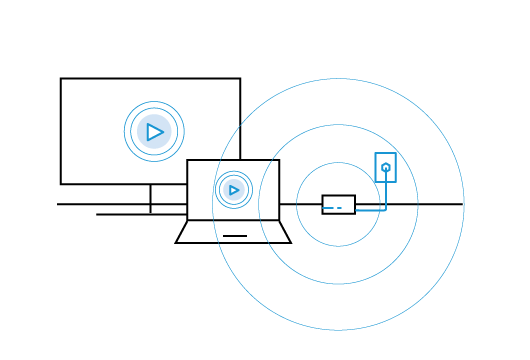
If you want to improve your home’s wireless network, it might be time to try wires. But don’t worry, we’re not expecting you to plug your laptop into an Ethernet cable or undertake a costly rewiring project. Rather, the right solution might be a wired network extender. This offers the best of both worlds: the convenience of WiFi with the reliability and robustness of wires. Best of all, it’s affordable and can be installed in minutes.

Before we dive into the details of network extenders, let’s cover some basics about home WiFi. A router’s wireless signal travels a finite distance. This means that wireless devices farther away from the router will manage to get only 10-50 percent of the bandwidth compared with clients closer to the router. In addition, common architectural features of the home, like walls and floors, can impact the wireless signal and make it more difficult to reach certain areas of the home.

This might be why, your WiFi is so slow in the upstairs bedroom or family room. For example, let’s imagine the wireless router is at one end of the home, and when you try to watch an online video on your laptop at the other end of the house, you get stutters and long buffering pauses.

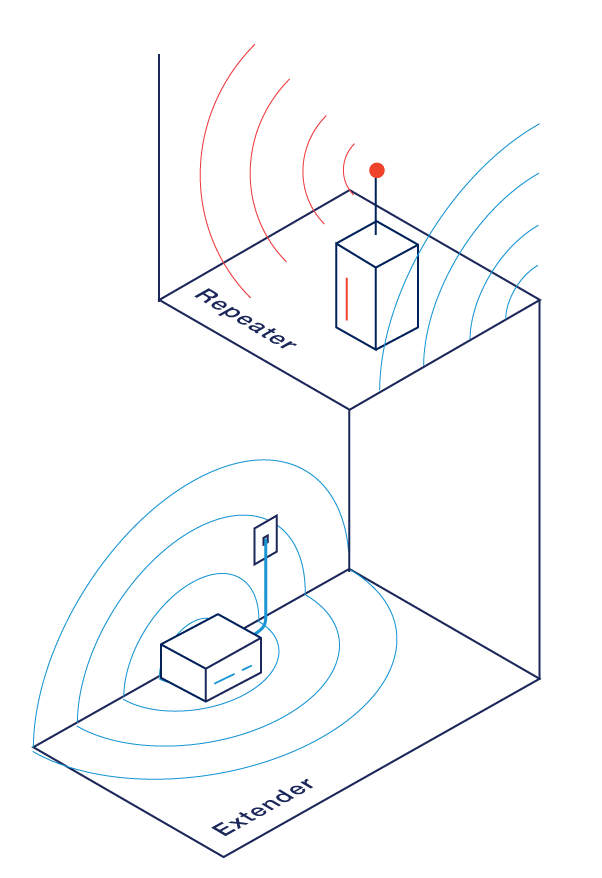
There are two different methods that can improve the wireless network performance at the far end of the house: WiFi repeaters (wireless only) and WiFi extenders (wired-wireless).

WiFi Extenders vs. WiFi Repeaters

The first type of wireless repeater that emerged on the scene was a basic WiFi repeater. This wireless device is installed somewhere in between the wireless router and the area of the home that needs a signal boost. WiFi repeaters basically catch a wireless signal and then rebroadcast it, giving you a stronger signal at the far end.

However, there’s a big catch: using a wireless repeater cuts in half the potential speed of a device’s network connection. That’s because that one radio basically needs to flip-flop between transmitting and receiving the new signal.

A WiFi extender, sometimes called a wireless network extender or wired-wireless network extender, works a little differently. This device uses both wired and wireless technologies to bring a wireless signal to an area of the home where network coverage has been weak (or non-existent).

The WiFi extender first uses a wired connection to travel throughout the home. That means you benefit from the reliability and high speed of cables, instead of relying solely on wireless signals. Don’t worry, you won’t have to add any more wires to your home; these WiFi extenders use your home’s existing wiring: MoCA-based solutions use your coax cabling and Powerline solutions use your electrical wiring.

An independent test found that Kiwee’s MoCA WiFi network extender surpassed popular WiFi repeaters (WiFi mesh extenders) by several hundred Mbps.

You can add a WiFi extender near the area of your home that needs a wireless boost – you just need either a coax jack (MoCA) or power outlet (Powerline) nearby. The extender takes the wired network signal and converts it to a strong wireless signal in the new area. And, as an added bonus, a newer network extender can even give a major performance boost to your home network by adding the fast speeds of 802.11ac. Even if your wireless router doesn’t support 802.11ac, you can still add an 802.11ac network extender to your home and upgrade your home to the latest technology.

Want to know more about Kiwee WiFi network extenders?

Click here.

Getting 900 Mbps and better – how to boost Wi-Fi around your home.

Doesn’t it seem like WiFi in the home is getting slower with speeds crawling along and dropped or no WiFi signal? Consider the requirements we put on our WiFi router: streaming TV shows, movies and music while we’re texting, emailing and playing online games. Did you know that one streaming HD TV show needs about 1,000 Megabits (Mbps) of internet speed per hour while a 4k stream requires even more to the tune of over 25 Megabits per second!

That’s a lot of WiFi signal demands for one router to handle. What you need is a Wi-Fi home network that gives you consistent high-speed WiFi at 900 Mbps or better and WiFi coverage in every corner of you home.

Boost Wi-Fi around your home now to ensure quality streaming

Getting that secure high speed 900 Mbps or better Wi-Fi boost isn’t difficult. It does requires scoping out three elements of your WiFi: age and capabilities of your wireless equipment; measuring your current wireless router speeds and adding Wireless Network Extenders or Wired Wireless Network Extenders along with your existing Wi-Fi router.

Wireless Equipment

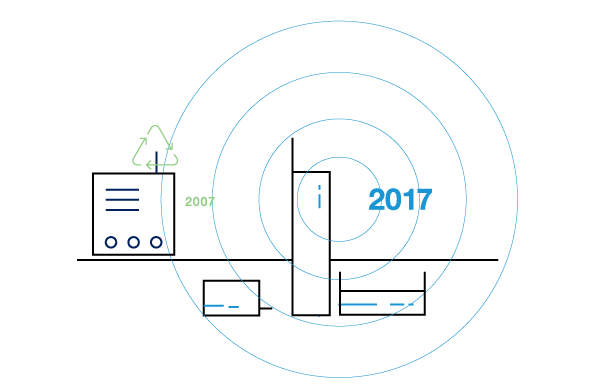
Ditching your old 2015 or earlier Wi-Fi router for a newer model with greater WiFi strength and newer 802.11ac Wi-Fi capabilities can help network performance. Learn more information about swapping out older equipment here (hyperlink: ‘Simple Tips to Improve your Home’s Wi-Fi’). Keep in mind, replacing an old existing Wi-Fi router is just step one. You’ve still got WiFi devices all over your house that need quality WiFi.

Measuring wireless router speeds

Next, test the speed of your WiFi router. ISPs typically have web tools on their home page you can use to measure those speeds. Also review your current service level agreement to understand the contracted speeds guaranteed by your ISP.

Your Wi-Fi router’s speed, location and type of wireless connectivity (802.11 ac or older 802.11 b/g/n) as well as the physical distance from your WiFi devices to a good WiFi signal are extremely important. Remember, a WiFi router’s wireless signal has a limited reach. Once your WiFi device goes beyond that reach, you experience snail crawl WiFi speeds or no WiFi at all.

If you’ve confirmed router speed as slower than slow while WiFi devices are all over your home, you’ll need to enhance speed and performance by bringing a quality WiF source to your WiFi devices. I call it bridging the WiFi gap. To get that WiFi source and bridge WiFi gaps, you may need is to add a Wireless Network Extender or Wireless Wired Network

Wireless and Wireless Network Extenders boost with backhaul

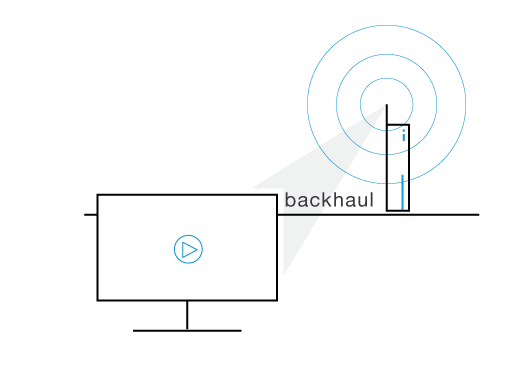
Backhaul is that physical gap from your Wi-Fi router’s signal to your wireless devices. For example, if your Wi-Fi router is in the downstairs den and your favorite 4K wireless device is in the upstairs bedroom, then the backhaul is the gap of Wi-Fi existing between the 4K bedroom and the den.

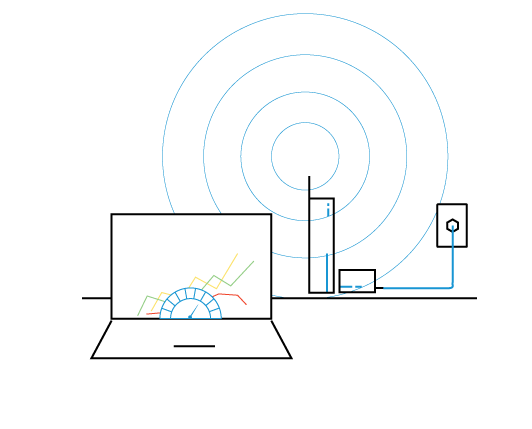
Except for the smallest of homes, you bridge that gap (backhaul) with a Wireless Network Extender or Wireless Wired Network Extender. Even third party testing confirms using a Wireless Wired Network Extender provides the best Wi-Fi boost at 900 Mbps or better.

Wireless Wired Network Extenders including Kiwee’s WCB6200Q combine the ease of WiFi with a wired network backhaul using WiFi, Ethernet, MoCA technology and your existing TV coax cabling. These Wireless Wired Network Extenders offer 900 Mbps or better Wi-Fi boost in speeds.

Now you can simultaneously stream those 4K movies, watch an HD TV show, participate in the latest CS:GO team strike and catch up on after-work emails knowing your WiFi is speeding along at 900 Mbps or more.